A Three-Pass Listening Check Before You Share an AI Song
A repeatable translation test for the tiny edit you hear only in headphones, the vocal that vanishes in mono, and the low end that overwhelms a larger speaker.
Your AI song feels enormous in the headphones you used while editing. Then it reaches a phone speaker: the vocal steps backward, the hook loses weight, and a bass note that felt exciting turns into a papery buzz. The track did not change. The playback system exposed a decision your usual setup had been hiding.
That is the translation problem. Listeners use small mono speakers, earbuds, cars, televisions, laptops, and systems with very different frequency responses. No single setup tells the entire truth, so release readiness is not a last glance at the waveform. It is a short sequence of deliberate listening checks with a written pass condition.
Begin with an untouched export and a fixed playback level. Do not raise each system until the track sounds impressive; that turns a quality check into three unrelated loudness demonstrations. If you cannot yet name the dominant problem, run the broader initial audio triage guide first. Then return here with one version, one repair goal, and a notes page.
01 / Inspect the edges
Pass 1: The Analytical Headphone Pass (Microscopic Flaws)
Use the most neutral, familiar headphones you have. Open-back studio headphones or accurate in-ear monitors can make small defects easier to locate, but expensive equipment is not the requirement. Familiarity matters more: you should already know how normal vocals, cymbals, bass, and reverb tails behave on this pair.
Listen once from start to finish without touching a plugin. Mark the timestamp whenever you hear a click at an edit, a clipped breath, a consonant with a metallic edge, a pitch or timbre that wobbles, or a reverb tail that suddenly folds into a watery texture. An AI artifact is only a useful label after you describe what you actually hear and where it happens.
Now inspect the file boundaries. The first half-second should not contain an accidental noise burst, truncated pickup, or silence that feels unintended. At the other end, let the last note and reverb tail finish naturally. A very short fade can remove a boundary click; it cannot restore a musical decay that was cut out of the source.
Keep the monitoring level safe and moderate. A harsh top end may seem clearer at first when you turn it up, then become tiring after a minute. Conversely, very quiet monitoring can hide clicks. Use one repeatable level, loop only the marked moments, and change one thing at a time. If the fix removes air from the vocal or softens drum attacks, back it off.
Headphone pass
No unexplained clicks, chopped phrase boundaries, piercing consonants, unstable tails, or obvious vocal distortion remain at your normal editing level.
02 / Collapse the picture
Pass 2: The Mono Smartphone Pass (Vocal Balance & Phase)
A phone speaker removes much of the deep bass and presents a narrow or mono image. That makes it useful for a specific question: does the song still communicate when width and low-end weight stop doing the persuasive work? Export or route a true mono sum rather than merely placing a stereo phone on the desk.
Play the busiest verse and chorus around half of the phone's available volume in a reasonably quiet room. Listen for the lead vocal, the main rhythmic pulse, and the hook. They do not need to sound identical to the headphone version. They do need to remain recognizable without forcing you to lean toward the speaker.
If the vocal drops sharply in mono, do not immediately boost it. Return to the stereo session and compare the center against the side information. An unnaturally wide vocal, doubled part, or stereo effect may be cancelling when the channels combine. Reduce width or adjust the offending effect, then repeat both the mono and stereo checks. A mono fix that damages the stereo image is not a pass.
Also separate intelligibility from loudness. A vocal can be present but smeared: consonants disappear, vowels blur into guitars, or the hook loses its shape when the arrangement becomes dense. Lower the backing briefly. If the words become clear, rebalance or create a small pocket around the vocal instead of adding blanket brightness.
Phone pass
The lead vocal, hook, and pulse remain understandable in mono at moderate volume, with no major element disappearing or becoming painfully sharp.
03 / Test physical low end
Pass 3: The Car / Hi-Fi Pass (The Sub-Bass Reality Check)
A car cabin and a larger hi-fi system move more air than a phone, but they also add their own resonances. Use a familiar system and begin at an ordinary listening level. The goal is not to find out whether the doors can rattle. It is to learn whether certain bass notes swell, whether the kick loses its attack, and whether low-frequency energy makes the rest of the mix pump or blur.
Compare at least two sections: one sparse passage and the densest chorus or drop. If a single note overwhelms the car while neighboring notes feel controlled, the problem may be a resonance in the file, the room, or both. Move to another seat or a second full-range system before making a deep EQ cut. A defect that appears in only one acoustic position is not yet a reliable source diagnosis.
Inspect the spectrum below roughly 40 Hz only after you hear a problem. A gentle high-pass filter near the bottom of the audible range can reduce subsonic energy, but 32 Hz is a starting point, not a universal cutoff. Raise it only while comparing against the raw version. Stop if the kick loses weight, the bass note becomes smaller, or the groove no longer feels physical.
Watch true peak as well as the speaker. A limiter can hold sample peaks while codec conversion or reconstruction produces higher inter-sample peaks. Leave sensible margin and audition the final encoded reference if your workflow provides one. Distortion at a high playback setting is not automatically a file fault; distortion that follows the same moment across systems deserves investigation.
Car / hi-fi pass
The low end stays controlled across sparse and dense sections, no repeated moment rattles or distorts at a normal level, and the vocal remains present when the bass arrives.
04 / Record the decision
The 3-Environment Translation Scorecard
Memory is generous to a mix you have heard fifty times. Write the result before you adjust anything. A fail is not a verdict on the song; it is a timestamp and a repair instruction. After one focused change, rerun every environment because a phone-focused vocal boost may become aggressive in headphones, while a car-focused bass cut may empty the hook elsewhere.
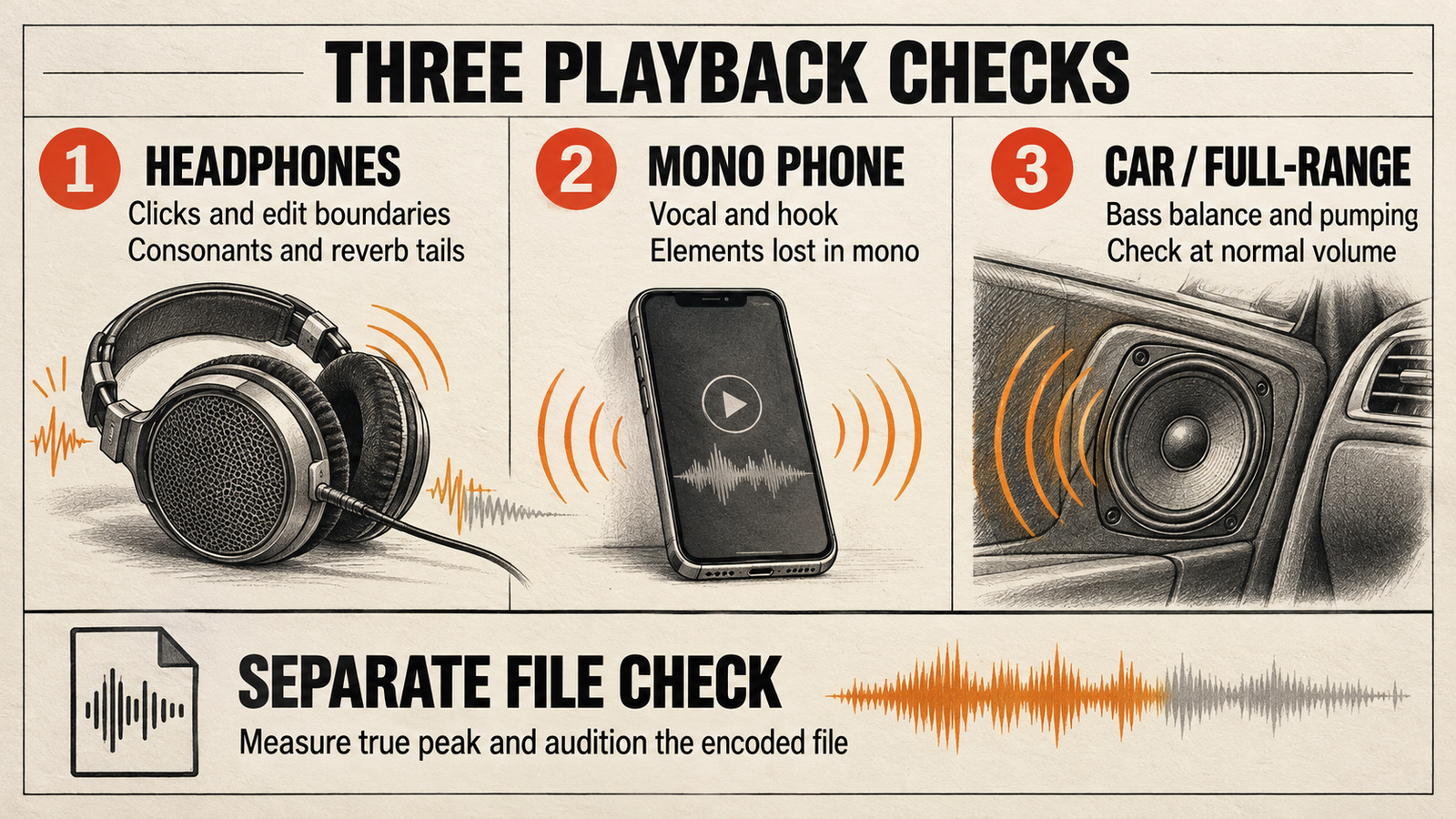
| Environment | Focus | Pass condition | Status |
|---|---|---|---|
| 1. Headphones | Clicks, vocal edges, cymbals, intro and tail | No distracting boundary or high-frequency defect at the reference level | Pass / Fail |
| 2. Smartphone (mono) | Vocal intelligibility, hook, phase-sensitive width | Words and musical center remain recognizable without strain | Pass / Fail |
| 3. Car / hi-fi | Sub-bass buildup, true-peak stress, low-end masking | No repeatable distortion or bass bloom at a normal listening level | Pass / Fail |
The release decision is simple: all three rows must pass. If one fails, log the system, timestamp, audible symptom, and next small action. Repair that problem, level-match against the untouched export, and repeat the full sequence. Three green rows mean the track translates within the limits of this test—not that every listener, platform, room, or legal review will agree. For a generated Mureka file, the Mureka cross-speaker diagnostic worksheet adds a focused room-versus-file check before you commit to processing.
Streaming Delivery Checks: Spotify, Apple Digital Masters, and True-Peak Headroom
For loudness context, Spotify says its Normal setting targets about −14 dB LUFS during playback and recommends keeping true peak below −1 dBTP for lossy playback; for masters louder than −14 dB integrated LUFS, it recommends below −2 dBTP. Apple’s Digital Masters guidance recommends at least 1 dB of headroom to reduce oversampling-related clipping, while Apple describes Sound Check as volume normalization without publishing a fixed LUFS target in its technical brief. These are delivery checks, not creative loudness targets or acceptance guarantees. Read the current Spotify guidance and Apple Digital Masters brief before delivery.
A mono phone-speaker pass checks whether the vocal and musical center survive a narrow-band playback path; it does not predict whether AAC or Ogg encoding will clip. Check true peak separately against the destination’s current advice, then confirm the delivered file with the encoder or distributor workflow you actually use. Apple’s AURoundTrip tool lets you audition AAC encoding, while afclip checks for clipping. An Apple Digital Masters workflow involves more than selecting a limiter ceiling; a listening scorecard does not confer the designation. Start with the five-point source-quality gate before mastering, and use the level-matched before-and-after comparison guide when deciding whether a repair or limiter improved the mix.
05 / FAQ
Frequently Asked Questions
Does Spotify reject songs with AI artifacts?
This listening check cannot predict acceptance by Spotify or by your distributor. Audio artifacts are still worth fixing because they can distract listeners, but delivery rules, content policies, and rights checks are separate from sound quality. Review the current requirements of the service you actually use before submitting.
What LUFS target should I aim for when releasing on streaming platforms?
There is no single artistic loudness target for every platform and genre. Spotify currently describes −14 dB integrated LUFS and a maximum true peak below −1 dB TP as playback-optimization guidance, not as an upload acceptance rule. Preserve dynamics, check true peak, and confirm the current guidance for each destination.
Does passing this check mean I own the copyright to the song?
No. The scorecard evaluates audible translation only. It does not determine authorship, ownership, licensing, disclosure duties, or whether a distributor will accept the release. Those questions depend on the generator, source material, distributor, and applicable law.
Does bass or vocal body disappear when you sum the channels? Follow the targeted guide to fixing mono compatibility and phase issues before adding more width.
Your next move
Write one fail before you reach for one more plugin.
Use the raw export, keep playback levels repeatable, and record the first system that exposes a problem. Fix the timestamp—not the entire song—then begin the three-pass check again. Release readiness is translation you can repeat, not perfection promised by one pair of headphones.
Run the scorecard