Wide in Headphones, Hollow in Mono: Fixing Phase Issues in AI Music
The headphones sound huge. The mono switch takes the bass away. Find the missing center before adding more width.
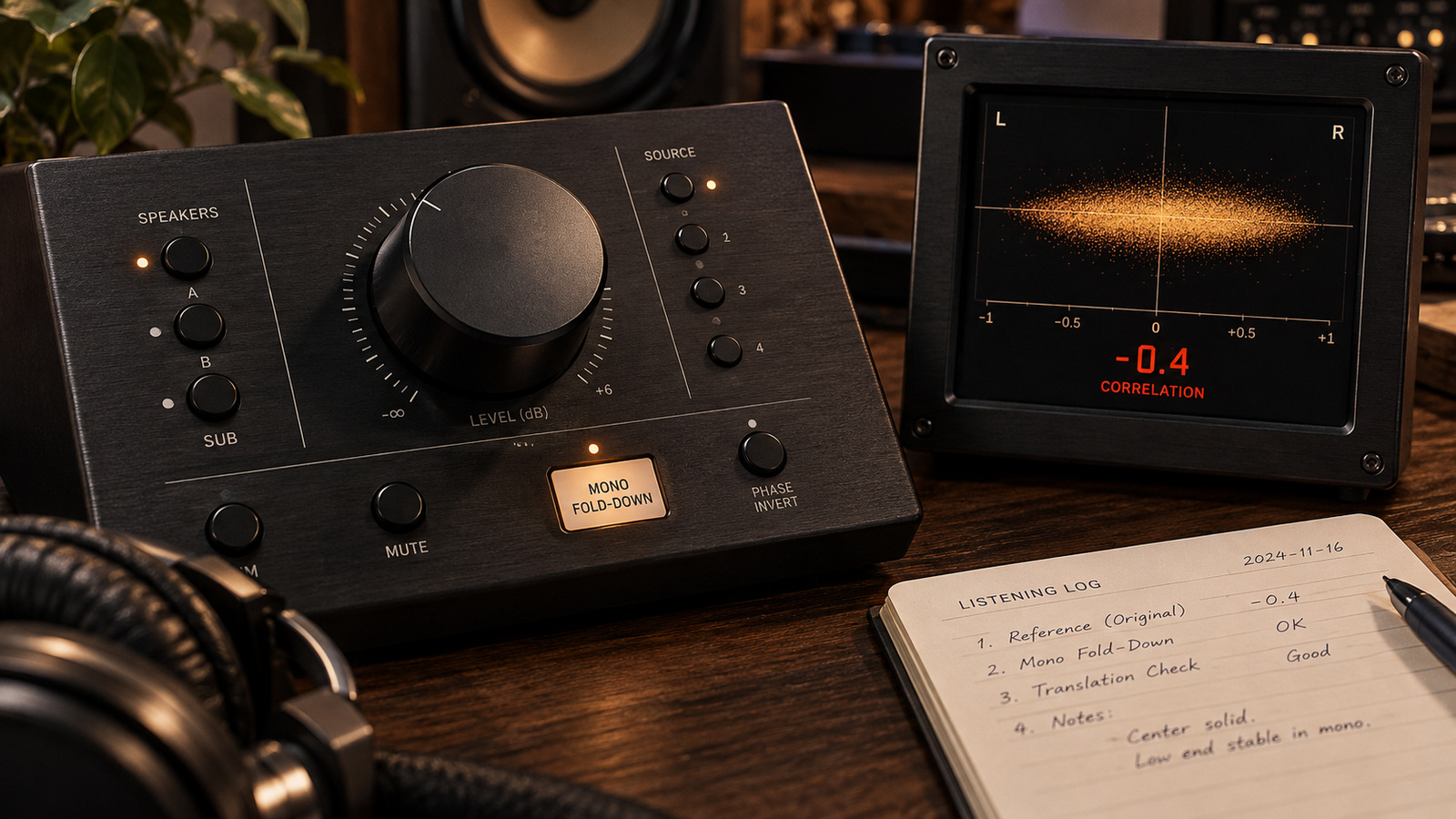
Your Suno, Udio, or Mureka track may feel spacious on headphones, then lose bass or vocal body elsewhere. If the same part disappears when you sum left and right to mono, phase cancellation is one possible cause. If it stays intact in a controlled mono sum but sounds thin only on a phone, investigate the phone's bass response and playback settings first.
Phase cancellation means overlapping signals partly subtract when added together. The symptom does not reveal how a closed generation model created the file. For other problems, start with the 30-second audio triage guide; for an existing download, keep existing Udio file checks alongside this narrower test.
01 / Hear the missing part
How to Hear and Measure Phase Cancellation in 30 Seconds
Headphones send each channel mainly to a separate ear. A wide effect can sound impressive there even when its left and right components cancel in an electrical mono sum. A phone or Bluetooth speaker is not automatically a mono test: devices differ, and some use multiple speakers or additional processing.
The One-Button Mono Fold-Down Test
Save an untouched copy. Loop a dense chorus, bypass your processing, and put a mono utility at the end of the monitoring path. Confirm that it sums both channels rather than selecting only Left or Right. Toggle stereo and mono at a comfortable level, listening to the same bass note, snare hit, and lyric each time.
Some narrowing and quieter ambience are expected. A bass fundamental that almost disappears, a hollow lead, or a new swishing tone deserves investigation. Account for the utility's summing gain before judging overall loudness. Then restore your effects one at a time: if the problem begins with a widener or delay, repair that stage before changing the export.
Reading the Phase Correlation Meter (-1 to +1)
iZotope's Imager documentation describes +1 as matching channels, 0 as uncorrelated, and -1 as opposing channels. Sustained negative readings warrant a mono audition; a brief dip alone is not a verdict. On a conventional vectorscope, a horizontal trace indicates opposing channels and a vertical trace indicates mono.
A positive broadband reading can hide a narrow problem band. Solo the bass range or an affected vocal phrase while inspecting correlation, then return to the full mix. Do not chase an arbitrary +0.3 target at the expense of the arrangement. The meter is a witness, not the producer.
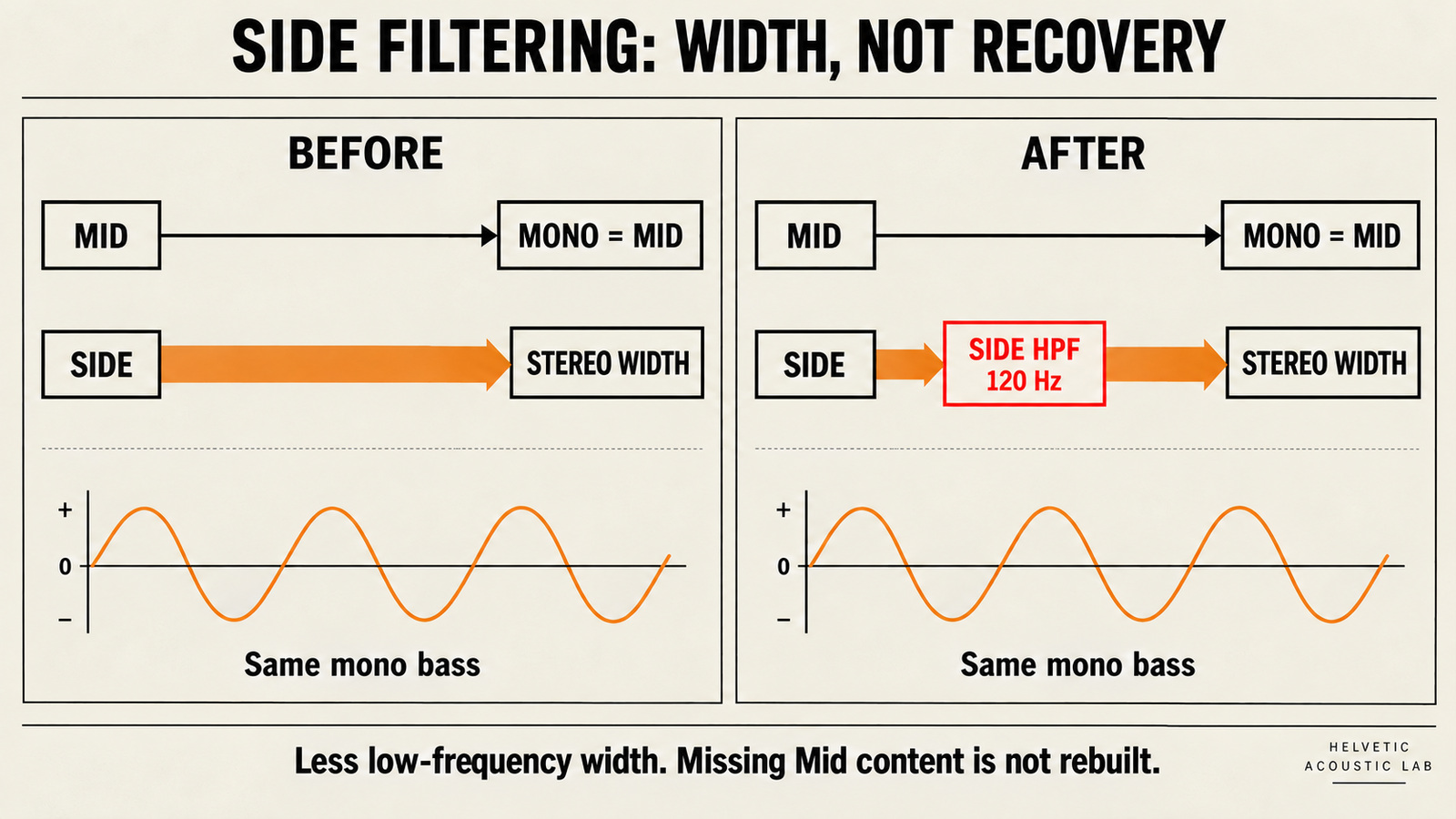
Mid/Side processing separates stereo into a channel sum and a channel difference. With the normalization M = (L + R) / 2 and S = (L - R) / 2, decoding gives L = M + S and R = M - S. The mono fold-down is Mid. Side-only processing leaves that sum unchanged in an otherwise linear path, with Mid gain fixed and no later nonlinear processing.
02 / Choose a frequency zone
The 3-Band Phase Repair Routing Table
Use these ranges to locate a symptom, not to diagnose the generator. Audition Side to hear the difference content discarded by a mono sum, then audition Mid to hear what survives. Removing Side does not transfer those sounds into Mid.
| Frequency zone | What disappears in mono | Possible cause to test | Targeted move and limit |
|---|---|---|---|
| Sub & low bass: 20–120 Hz | Kick weight or bass foundation | Opposing low-frequency channel content or a widening stage | Bypass widening first. If Mid bass is usable, try Side HPF at 100–120 Hz, 12–18 dB/oct, to reduce width. Missing Mid bass needs a usable source. |
| Low-mids & vocal body: 200–800 Hz | A lead sounds hollow or distant | Delayed doubles, chorus, or another overlapping layer | Try a small 2–3 dB Side cut only for excess stereo wash. If the mono vocal stays hollow, repair the source layer or compare a stem. |
| Upper mids & highs: 2–10 kHz | Hi-hats or synth leads swish or lose focus | Inter-channel delay or a time-varying stereo effect | Bypass the suspected effect; cautiously reduce Side in the affected 2–6 kHz region or repair its stem. Reject a duller result that leaves mono damage intact. |
These are starting points for a short loop. Vocal body spans different frequencies for different singers, and bass notes need different cutoffs. A diagnosis based only on a frequency label is a very tidy way to fix the wrong thing.
03 / Keep the useful width
Step-by-Step Mid/Side Phase Repair Without Losing Stereo Width
Step 1: Check the Center Before Filtering Side Below 120 Hz
If the kick and bass already survive in mono but spread too widely in stereo, audition a Side-only high-pass filter near 100–120 Hz with a gentle 12–18 dB/oct slope. In a stereo instance of FabFilter Pro-Q, select Side for that band; its stereo placement documentation confirms independent Mid and Side filtering. With another EQ, verify that it supports this routing before using it.
Keep Mid gain fixed and bypass later dynamics during the comparison. Adjust the cutoff downward if warmth disappears, then recheck upper-frequency width too: real filters have a transition region. The change narrows the surviving low end; it does not guarantee unchanged width above 150 Hz or stronger mono bass.
If the bass is missing in Mid before this move, stop. Try bypassing upstream stereo processing or use a usable bass source; filtering away Side will simply remove more of the stereo bass. Return to the 5-point pre-mastering source gate before limiting a weak center.
Step 2: Separate Hollow Mono Vocals from Excess Stereo Wash
Loop a phrase where the vowel loses body. Listen to Mid and Side separately at low level. If Side carries too much diffuse vocal or reverb, audition a broad 2–3 dB Side reduction around the affected range, often somewhere within 250–600 Hz. Keep it only if the stereo vocal becomes clearer without losing space.
Comb filtering is a series of peaks and dips created when a signal meets a delayed version of itself. A Side cut alone does not remove those dips from the mono sum. If the voice remains hollow there, bypass the offending double or delay at its source, compare a dry vocal stem, or replace the damaged passage. Use unmasking a muddy AI mix when the voice is covered by other instruments rather than cancelled.
Step 3: Check Stem Recombination vs. Stereo Mid/Side
If you have separate parts, compare their untouched sum with the stereo reference first. Then bypass widening, chorus, or delay on the affected part. Center a usable bass or lead stem only after listening to what that removes. If a stereo stem itself collapses in mono, simply summing it will not repair it; audition a single clean channel as a new mono source only when it actually contains the needed part.
Use the stems-or-stereo repair guide to weigh isolation against bleed and separation artifacts. Listen to every change in the full arrangement. If the lyric or bass is missing from all available versions, compare another source or regeneration instead of trying to EQ absent information back into existence.
04 / Make the result travel
Verify on a Real Mono Speaker and Level-Matched A/B
Follow the blind level-matched comparison protocol: compare the same passage at matched loudness, first in stereo and then in mono. Keep the summing method consistent between versions. For a Side-only edit with Mid fixed, the controlled mono result should remain the same; an unexpected change calls for checking routing, gain compensation, or later processors.
Re-enable the final chain and check again. Listen on a known mono path or send the mono sum to one speaker, then compare the intended phone or Bluetooth device at a comfortable volume. A small speaker may not reproduce deep bass even from a clean mono source, so judge bass cancellation on a full-range path as well.
Log the timecode, affected part, original mono result, one adjustment, and final stereo/mono result. Accept the edit only if the problem improves and lyrics, drum attack, and musical balance survive. Finish with the 3-pass release readiness check and the Mureka 3-speaker playback worksheet for translation across listening systems.
05 / FAQ
Frequently Asked Questions
Should I put a stereo widener plugin on a dull AI track?
First compare the untouched file in stereo and mono. A widener that delays one channel can cause comb filtering when the channels are summed. If width is still useful, try a small change above the bass region and repeat the mono test. Different widening designs behave differently; stop if a lyric, bass note, or drum hit loses weight.
What is a safe phase correlation reading for Spotify and Apple Music?
Use positive correlation as a diagnostic preference, not a delivery requirement or a platform pass mark. A whole-track reading cannot certify every frequency band or every moment. Inspect the bass and lead vocal in mono, investigate sustained negative readings, and check the actual submission specifications separately.
Why does inverting the phase of one channel not fix my AI song?
A polarity flip reverses the sign of every sample in that channel. Flipping the right channel makes the new mono sum equal the old channel difference: centered sounds can disappear while wide material becomes prominent. It can correct a genuine whole-channel polarity mistake, but it does not undo frequency-dependent phase shifts or delays. Test a copy and undo it if the song loses its center.
Keep the center
Check the sum before widening the song.
Keep the original. Make one reversible change. Save the version that holds its essential parts in mono and still feels like your song in stereo.
Return to the routing table ↑