When the Chorus Hurts: Taming AI Highs Without Losing the Spark
Keep the lift of the chorus while controlling the 4–8 kHz buildup that makes cymbals, doubled vocals, and bright synths feel sharp.
The verse feels balanced. Then the chorus arrives and the whole track seems to lean toward your face: cymbals splash, doubled vocals harden, and every bright synth asks for the same piece of attention. You turn the song down even though you like the musical lift.
A bright mix is not automatically harsh. Brightness can make the chorus feel open and alive; harshness is the moment that useful energy becomes tiring, masks the lead, or makes you lower playback volume. The distinction matters because a broad high-frequency cut can solve discomfort by removing the sparkle you wanted.
Start with an untouched copy of the export. Choose one verse and the chorus immediately after it, then set a comfortable listening level. If you begin loud, nearly every corrective move will look sensible. Louder is persuasive. It still does not make the decision fair.
01 / Diagnose
Why AI choruses can crowd the upper mids
A chorus usually adds density: more voices, wider pads, harder drums, extra percussion, or a lead layer. Several of those sounds carry energy in the upper mids, roughly the area where consonants, snare crack, guitar bite, and cymbal attack compete. When the layers arrive together, the issue may be accumulation rather than one obviously broken sound.
Do not assume the generator has placed everything in one “flat layer.” Treat that as a listening hypothesis, not a fact about a closed model. You can test the audible result: loop eight bars, lower the monitor level, and ask whether the edge follows a specific event. If the pain arrives on every vocal s, that points toward sibilance. If it follows each crash cymbal, the cymbal layer is the better target. If the entire chorus hardens at once, section-level buildup is more likely.
Equal-loudness contours describe how much sound pressure pure tones at different frequencies need to seem equally loud. Hearing is particularly sensitive in the upper mids, around 3–5 kHz, so check that area alongside the 4–8 kHz chorus buildup. A chorus can sound sharp without digital clipping. ISO 226:2023 describes pure-tone listening under specified conditions; it does not set a fatigue threshold for a song. Judge the correction at a comfortable playback level.
Separate sparkle from harshness
Sparkle sits above the body of the mix and helps attacks read clearly. Harshness pulls attention away from the song. Sweep a narrow EQ band only to locate the problem, not to make the final setting: temporarily boost a band, move slowly through 4–8 kHz, and stop when the unpleasant character becomes obvious. Return the gain to zero before deciding on a cut.
Keep the sweep quiet and brief. The goal is a location, not an endurance test. If no narrow area explains the discomfort, compare the arrangement and overall chorus level before adding more processing.
02 / Measure the change
The Verse-to-Chorus Energy Differential Rule
A meter can confirm a pattern, but it cannot decide whether a chorus is musical. Use the verse as your baseline, then compare the same frequency area in the chorus. The figures below are starting points for investigation, not mastering standards.
| Check | What to compare | Working boundary | If it crosses the boundary |
|---|---|---|---|
| 4–8 kHz band | Average band energy in verse vs. chorus | About +2.5 dB | Try a chorus-triggered dynamic cut, then listen again. |
| Cymbal audibility | Whether each hit masks a lyric or lead attack | The lead remains easy to follow | Target the cymbal events or side signal only after checking the stereo placement. |
| Listening fatigue | Three passes at a moderate level | No urge to keep turning down | Pause, rest your ears, then reduce the smallest responsible band. |
| Mono check | Chorus folded to mono | Brightness stays identifiable, not noise-like | Inspect wide layers and phase interaction before using more top-end EQ. |
That +2.5 dB marker is a troubleshooting threshold, not a pass/fail specification. A sparse verse and explosive chorus may need a larger contrast. What matters is whether the extra energy supports the arrangement or covers the vocal and causes fatigue.
Use the symptom to choose the next guide: a ring that trails into quiet gaps points to stationary hiss versus metallic shimmer; a sting only on vocal S, T, or CH sounds points to the AI vocal S-sound calibration test; and harshness that grows after limiting calls for the pre-mastering source check.
03 / Make one bounded move
Two surgical fixes: dynamic EQ vs. section automation
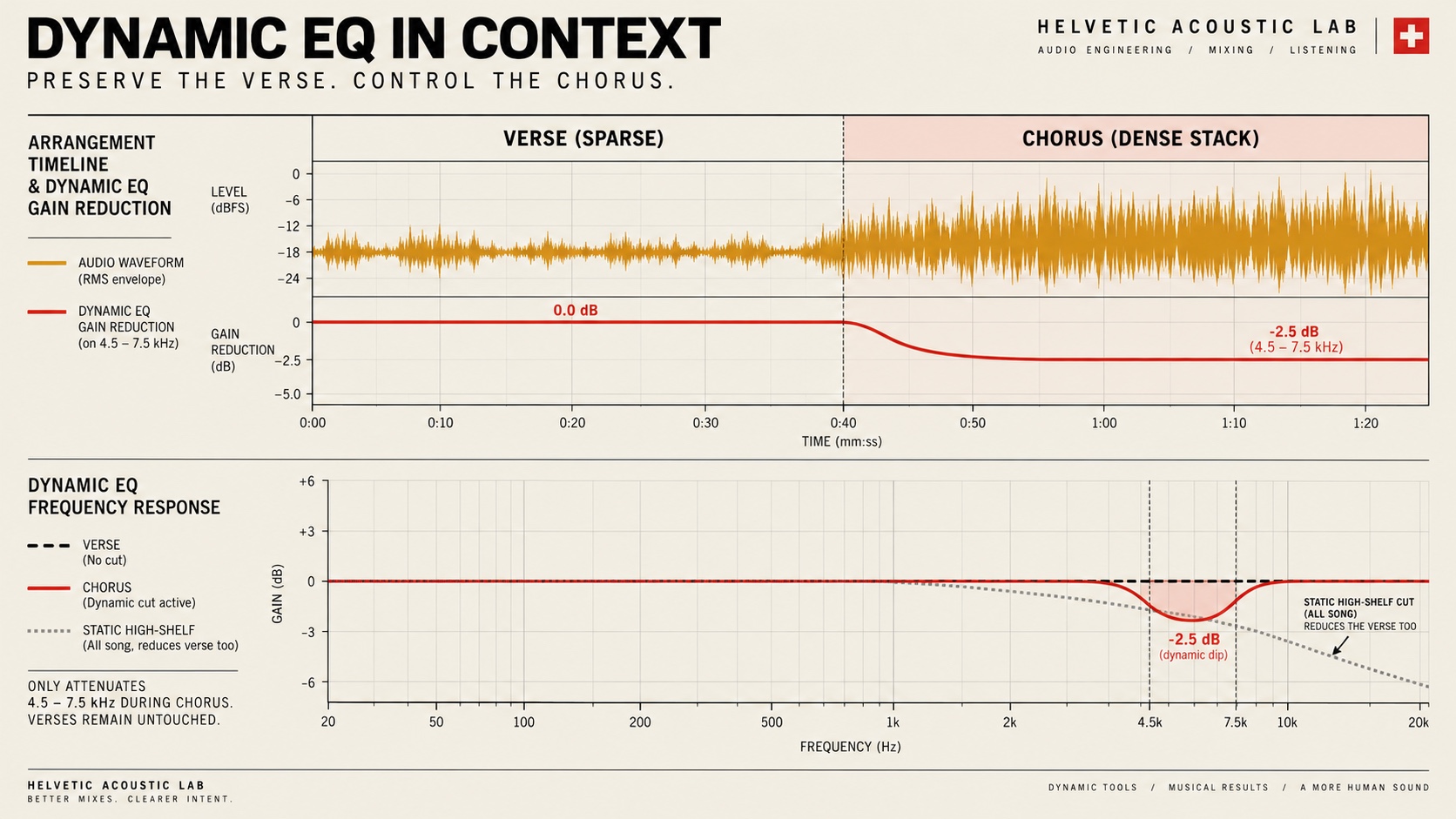
Fix 1: Dynamic EQ with Fast Recovery
Place a bell near the area you identified—5.2 kHz with a Q around 2.5 is a reasonable audition point, not a universal preset. Set the threshold so gain reduction appears on the harsh chorus peaks and mostly relaxes during the verse. Begin with 1–2 dB of reduction. Use a quick enough release that the band recovers between bright events without obvious pumping.
Watch the detector, then close your eyes. If the numbers move but the chorus still hurts, the band may be listening to the wrong layer. If the vocal loses articulation or the snare becomes papery, reduce the depth or move the center frequency. A narrow correction earns its place only when the offensive edge falls back and the lead stays present.
Fix 2: Region Gain and Curve Automation
Automation is often cleaner when the verse is already right. Draw an EQ or gain change that begins just before the chorus and returns smoothly as the section ends. A broad 1 dB dip on the bright bus may sound more natural than a deep narrow cut that fires on every cymbal hit. Add short ramps at both ends so the change does not click or announce itself.
A threshold follows signal level, not song sections. If a bright verse event also triggers the band, automate the band’s dynamic range to zero outside the chorus, or automate a smooth band-enable change if your plugin supports it. The diagram shows an example reduction; actual dynamic gain should recover between harsh peaks. Pro-Q’s dynamic EQ documentation explains the level-dependent behavior.
Automation also gives you a clear boundary: outside the chorus, the mix remains untouched. Compare the first chorus with the second. If only one section is harsh, copy nothing automatically; treat each region according to what you can hear.
After either fix, level-match the processed and original versions. A quieter chorus can seem smoother simply because it is quieter. Use the same short loop, toggle the processor off and on, and ask two questions: is the sharp edge less distracting, and does the chorus still feel like the high point of the song? Follow the blind, level-matched audio comparison protocol to compensate for the apparent loudness change. For a broader triage before processing, use the 30-second AI music cleanup guide.
04 / Optional texture
The tape-saturation smoothing check
Gentle tape-style saturation can round fast peaks and add harmonics that make a brittle edge feel less exposed. Treat 15 ips as a model choice you can audition, not a guarantee that the processor behaves like a particular machine. Keep the drive low, match the output level, and listen for softened attacks rather than obvious color.
Saturation is not a substitute for diagnosis. If cymbals turn grainy, the vocal becomes congested, or the chorus loses separation, bypass it. The cleaner move may be the automated EQ you already made. One useful processor is enough; a plugin chain does not become wiser by getting longer.
05 / FAQ
Questions before you dull the whole mix
Why does turning down the master volume reduce the harshness?
Our hearing changes with playback level, and the upper mids can feel especially insistent when you listen loudly. Turn the monitor level down before processing. If the chorus becomes comfortable and still translates at a moderate level, you may need a smaller EQ move than you first thought.
Can multiband compression tame cymbals without flattening the vocal?
Sometimes, but only after you confirm where the cymbals sit in the stereo field. A side-only band can leave a centered lead vocal mostly untouched, yet AI-generated mixes do not always follow that layout. Solo the side signal briefly, then judge the full mix again before committing.
What if the harshness is baked into the vocal stem?
Move the detector toward the exact consonants or phrases that hurt instead of compressing the full chorus. Use a narrow dynamic band or de-esser, reduce only a few decibels, and stop if the words begin to lisp or lose presence. A damaged performance may be a regeneration problem rather than an EQ problem.
Keep the contrast
Make the chorus exciting, not exhausting.
Save the original, change one section, and stop when the sharp edge steps back without taking the song’s lift with it.
Return to AI Music Fixer