Is It Hiss or Metallic Shimmer? A Listening Test for AI Songs
A two-second listening test for telling steady background noise from the moving, glassy texture that follows vocals, cymbals, and reverb tails.

A thin layer of broken glass seems to tremble behind the vocal. It is not a vinyl click, and it does not sit still like tape hiss. The texture brightens on an S sound, stretches through a reverb tail, and then changes shape when the cymbals arrive. That movement is the clue.
A regular noise gate reacts to level, not to the character of the sound. Set it gently and the metallic ring stays on top of the notes. Set it aggressively and the gate chops off breaths, cymbal decays, and room tails. The track becomes quieter between phrases but more abrupt, as if the ambience keeps hitting a trapdoor.
Save the untouched export before testing anything. Choose one short passage and keep the playback level comfortable. The goal is not to prove that the file contains a particular technical defect. It is to describe what you hear well enough to choose one bounded move. If you are not sure which defect deserves attention first, begin with the broader initial audio triage guide.
01 / Hear the motion
The Physics of Metallic AI Shimmer: Comb Filtering in Disguise
Comb filtering is the pattern created when a signal combines with a slightly delayed version of itself. Some frequencies reinforce while others cancel, leaving a row of narrow peaks and dips. When that pattern changes over time, the result can sound phasey, hollow, flanged, or metallic. You do not need to see a perfect comb on an analyzer to recognize the audible behavior.
Generated audio can contain unstable upper harmonics, smeared transients, or moving phase relationships. Those symptoms may resemble comb filtering, especially in dense vocal stacks, synthetic cymbals, and long reverbs. The rendered file does not reveal the private architecture that produced them, so treat “comb-filter-like” as a listening description—not a diagnosis of a model’s code.
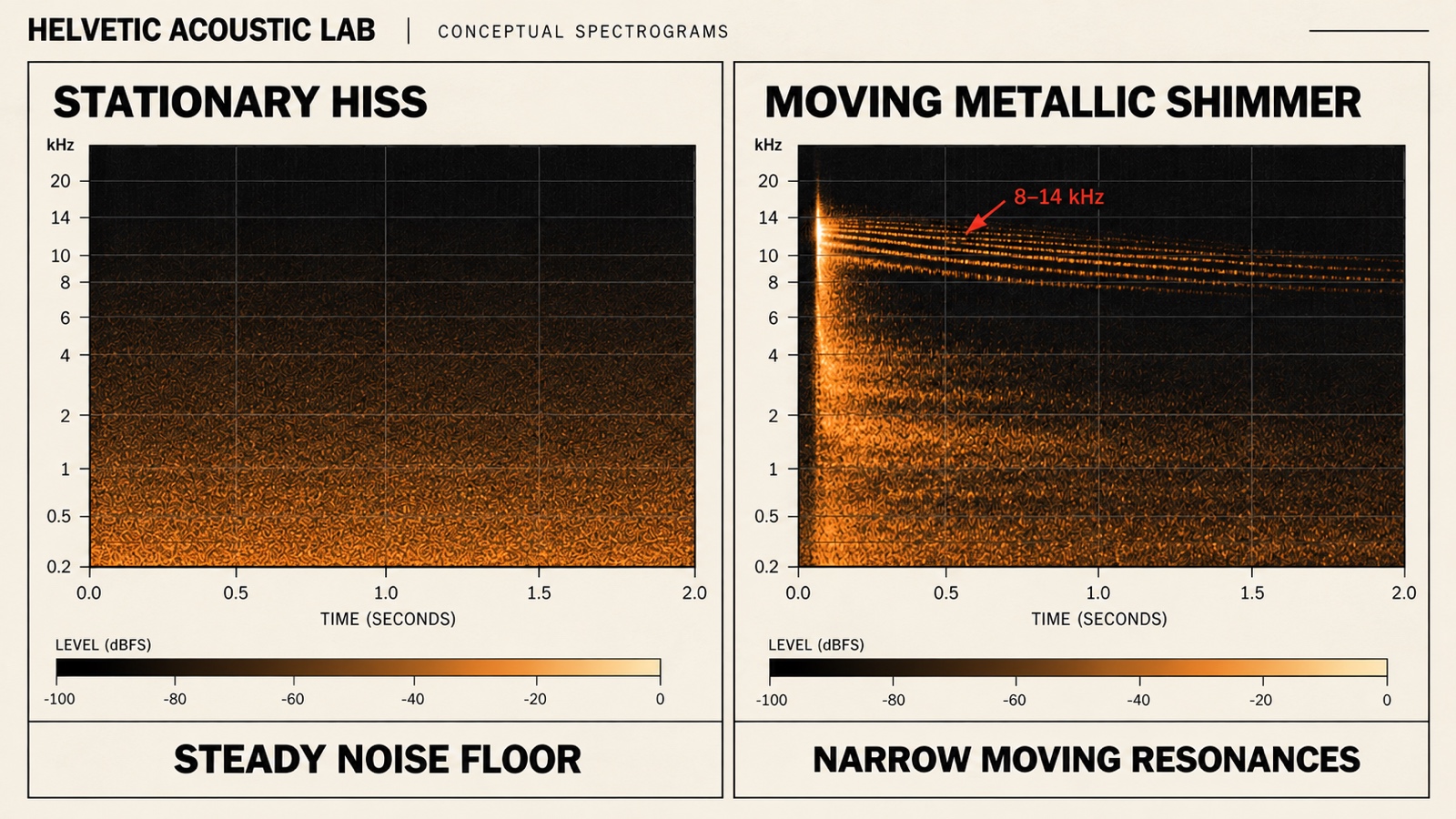
The 8–14 kHz area is a practical inspection range because it contains vocal air, bright consonants, cymbal sheen, and the top of many ambience tails. It is not a law. A harsh edge can sit lower, and a low-quality encode can spread roughness across a wider band. Start wide enough to hear the texture, then narrow the search only if the movement becomes clearer.
Steady hiss behaves differently. It remains present while the melody, vowel, and chord change. You hear a similar spray during a pause and under a sustained note. Shimmer appears attached to musical events: it bends after a consonant, chatters along a hi-hat, or rings as the reverb decays. Hiss is the floor. Shimmer dances with the track.
02 / Test two seconds
The Quiet-Tail Solo Test: A 2-Second Diagnostic
This test uses a quiet tail because a busy chorus can hide the difference between noise and moving resonance. Work from the highest-quality export you have, disable any mastering chain you added later, and keep the original beside the test version. Headphones can help, but low monitoring level matters more than expensive gear.
Step 1: Find a natural vocal decay or reverb tail
Look for the end of a verse, a gap after a vocal phrase, a cymbal decay, or the final two seconds of the outro. Choose a moment where the musical source stops but its ambience continues. Avoid a section with a new instrument entering halfway through the loop; you want one decaying event, not a miniature arrangement.
Step 2: Loop two seconds, then raise playback briefly
Loop the tail and listen once at your normal level. If needed, raise monitoring temporarily by up to 6 dB—never the file gain—and return it immediately afterward. A consistent “shhh” that keeps the same color suggests hiss. A liquid whistle, glassy flutter, or metallic ring that changes pitch or texture through the decay suggests shimmer. The hi-hat has not become a spray can; it is simply volunteering useful evidence.
Step 3: Check with a narrow monitoring band
Place a band-pass or bell filter in audition mode and sweep slowly from about 8 to 14 kHz. A Q around 8 can help locate a narrow ring, but do not boost the band permanently and do not sweep at high volume. The sweep is a magnifying glass. When one area makes the moving tone obvious, note the frequency and disable the audition boost.
| Audition band | What to follow | Full-mix check |
|---|---|---|
| 8–10 kHz | Does a narrow ring move with a consonant or cymbal decay? | Preserve the consonant and the first tick of the hi-hat. |
| 11–14 kHz | Does the upper tail flutter, or stay like a steady spray? | Keep vocal air and the space around the reverb. |
Compare both bands at a similar audition level, then restore the full spectrum. These are inspection windows; either one can contain hiss, shimmer, and wanted music.
After a small dynamic cut, listen to the removed signal if your processor offers a Delta mode. For example, TDR NOVA’s GR DELTA control auditions the changes made by its dynamics processors. If a clear melody, vocal body, or hi-hat attack dominates that difference signal, try a narrower band (higher Q), raise the threshold, or reduce the maximum cut. Return to the full mix and keep the change only if the metallic movement recedes without blunting those details.
Band solo is a different check. Pro-Q’s band-solo mode plays the frequency region affected by a band, so hearing wanted music there does not by itself prove that you removed it. Use solo to locate the ring, Delta to inspect the processing change, and a level-matched full-mix comparison to decide. When shimmer is isolated to a cymbal or synth stem, use the stems-or-stereo repair decision guide to choose the cleaner source.
Repeat the loop with the full spectrum restored. If the marked band moves with the vocal or cymbal and disappears when the event ends, treat it as dynamic shimmer. If the noise stays broad and similar through every pause, test a gentle expander instead. If the pain is strongest only when the full chorus arrives, use the separate guide to handling harsh highs in choruses; buildup is not the same problem as a ringing tail.
03 / Choose the smaller tool
Hiss, shimmer, or harshness?
Use the behavior of the sound to choose the processor. The figures below are conservative starting points, not presets. Different exports, monitoring levels, and arrangements will move the useful range. Bypass after every adjustment and keep the least processing that makes the symptom less distracting.
| What you hear | Where to inspect | First tool | Bounded starting move |
|---|---|---|---|
| Steady background hiss | Broad top end, often 10–20 kHz | Downward expander | Try a low threshold, 4–6 dB maximum range, and a release long enough to preserve tails |
| Sharp ring on vocal consonants | Often 7–9 kHz | Split-band de-esser or dynamic EQ | Use a narrow band and cap reduction near 3 dB; check that S and T remain intelligible |
| Moving glassy shimmer | Often 9–13 kHz | Dynamic resonance or spectral suppression | Use moderate depth and let the processor engage only when the ring rises |
| Metallic cymbal edge in loud sections | Often 5–8 kHz | Dynamic EQ or multiband compression | Keep gain reduction below roughly 2.5 dB and preserve the initial transient |
For steady hiss, lower the expander threshold until quiet passages settle, then lengthen the release until reverb stops pumping. An expander reduces the floor rather than slamming it shut. If the end of every word suddenly becomes dry, the range is too large or the release is too fast.
For a narrow moving ring, place a dynamic band where the sweep identified it and lower the threshold until only the worst peaks trigger reduction. Watch the meter, then close your eyes and listen. A graph can confirm that the processor moved; it cannot tell you whether the vocal still feels open.
Spectral smoothing is useful when the shimmer breaks into several nearby peaks that change too quickly for one EQ band. Keep the depth moderate and limit processing to the active region. If the entire mix starts to sound soft, watery, or detached from its transients, reduce the sensitivity before adding another stage.
For the stationary-noise branch, use the step-by-step guide to removing steady background hum and hiss. It separates low rumble, tonal hum, and broadband noise, with a noise-print check before spectral reduction.
04 / Know when to stop
The Loss-of-Air Warning: Stop Before It Sounds Underwater
Upper-frequency detail gives a mix air: the soft edge of a breath, the first tick of a hi-hat, and the space around a reverb tail. Shimmer occupies some of the same region. That overlap is why aggressive cleanup can win the battle against metallic sound and leave the song under a blanket.
Use a simple stop rule: keep the version that leaves a little artifact if the alternative loses vocal openness or cymbal shape. Twenty percent of the original shimmer is often less distracting than a top end that has been polished into fog. Complete removal is not the target; normal-volume comfort is.
Level-match the processed loop with the untouched one before deciding. Spectral tools can change apparent brightness and loudness, and a darker version may seem smoother only because it is quieter. Use a fair level-matched A/B comparison, switch without watching the plugin, and answer two questions: is the metallic movement less noticeable, and does the music still breathe?
Finally, listen outside the two-second loop. Check the quiet tail, the busiest chorus, and one normal verse. If the fix behaves in all three places, save it. If a Suno export contains several interacting defects, move to the Suno-specific export repair workflow and repair in sequence instead of stacking random processors.
05 / FAQ
Frequently Asked Questions
Can a high-shelf EQ remove the metallic sound?
A high-shelf can make the symptom quieter, but it lowers wanted cymbal detail, vocal air, and ambience at the same time. Use it only when the whole top end is consistently too bright. For a moving metallic ring, a narrow dynamic band or restrained spectral processor is usually easier to limit to the problem.
Why can a bright AI vocal sound glassy or metallic?
Bright vocals expose dense upper harmonics, consonants, and reverb. In a generated file, those details may contain unstable or phasey textures that move with the performance. You can diagnose the behavior by looping a quiet tail, but the file alone does not prove which internal model process created it.
Will an AI artifact remover completely eliminate shimmer?
Usually not without a trade-off. Strong suppression can soften transients, shorten ambience, and make the mix feel filtered. Aim to reduce the metallic movement until it stops pulling attention at normal playback level, then keep the more open version.
To hear what changed between versions, use delta listening and null-test verification. Check timing, gain, and routing before treating the residual as lost musical detail.
Your next move
Loop the tail. Follow the movement.
Save the raw file, find one clean decay, and run the two-second test. If the texture stays steady, try a gentle expander. If it moves with the music, control only the active resonance and stop while the vocal, cymbals, and room still sound alive.
Run the Quiet-Tail test